ChatGPT vs Claude for writing: which one writes better like you?


The two most popular AI writing assistants, compared on what writers actually feel: how the prose sounds, how well each follows instructions, what it costs, and what real users say. Benchmarks, prices and features checked on September 25, 2026.
The short version
|
Quick answer: pick by what you write
Both tools write well now. The gap is in their defaults, and defaults matter when you write every day.
| You mostly write | Start with | Why |
|---|---|---|
| Fiction, essays, your own voice | Claude | Leads the long-form fiction test at every paid tier; Styles learns from your own samples. |
| Books, long reports, documentation | Claude | A 1M-token context fits a whole manuscript in one chat. |
| Strict formats and house style | Claude | Users report it holds constraints through long responses. |
| Marketing variations at volume | ChatGPT | Fast batches of options and generous everyday limits, even on Free. |
| Research-heavy articles with data and PDFs | ChatGPT | Research, file analysis and drafting in one place. |
| Posts that need custom images | ChatGPT | Built-in image generation. |
| Editing your own drafts | Either, slight edge Claude | Claude respects your wording more often; ChatGPT’s writing blocks make inline edits quick. |
Not sure? Give both free tiers the same real assignment and compare the drafts before you pay.
What you are actually comparing in September 2026
“ChatGPT vs Claude” really means “whichever model your plan gives you by default,” and those names now change almost monthly. In September alone, OpenAI introduced GPT-6 Astra, GPT-6 Sol and GPT-6 Luna, while Anthropic released Claude Opus 5.5 and a beta of Claude Docs. ChatGPT is also by far the bigger product: in February 2026 OpenAI said it had reached 900 million weekly active users and 50 million paying subscribers.
Plans, default models and context windows
| Tier | ● ChatGPT | ■ Claude |
|---|---|---|
| Free | $0. GPT-5.6 Luna, unlimited everyday text chats, 3 uploads a day, 27K-token context. Ads in some markets. | $0. A Sonnet model (currently Sonnet 5), rolling five-hour limit, 200K-token context. No ads. |
| Budget | Go, $8/month. GPT-5.6 Luna with roomier limits, 54K context. Ads in some markets. | No equivalent plan. |
| $20 tier | Plus, $20/month (monthly only). GPT-5.6 Sol; 54K context in instant mode, 256K in reasoning mode. | Pro, $20/month or $17/month billed yearly. Opus 5.5 and Sonnet 5, limited Fable 5.1; 1M-token context. |
| $100 | Pro, 5x Plus usage. GPT-6 Astra (shown as GPT-6 Pro); 128K instant, 400K reasoning context. | Max 5x, 5x Pro usage. Fable 5.1 included, up to 50% of weekly usage. |
| $200 | Pro, 20x Plus usage. Same models as Pro $100. | Max 20x, 20x Pro usage. |
| Teams | Business from $25/seat monthly ($20 yearly); Premium seat $100 to $125. | Team Standard $25/seat monthly ($20 yearly); Premium $125 ($100 yearly). |
Rollouts vary by account and region, so check the model picker in your own app.
How much text fits in one chat. Anthropic estimates 200K tokens at roughly 500 pages; tokenizers differ, so compare the scale rather than exact pages.
By the numbers: independent writing benchmarks

Benchmarks send identical prompts to every model.
No benchmark can tell you whether a paragraph sounds like you, but public leaderboards show how models rank on identical assignments. We pulled the three most cited writing boards on September 25, 2026:
- EQ-Bench Creative Writing v3. 32 short creative prompts, run three times each, scored by a judge model (Claude Sonnet 4.6) and turned into an Elo rating.
- EQ-Bench Longform. The model plans and revises a story, then writes it in eight chapters of about 1,000 words. Scored 0 to 100 by the same judge.
- Arena Creative Writing. Anonymous side-by-side votes from real users: 1,261,284 votes across 400 models as of September 13, 2026.
Short-form creative writing (EQ-Bench Creative Writing v3, Elo)
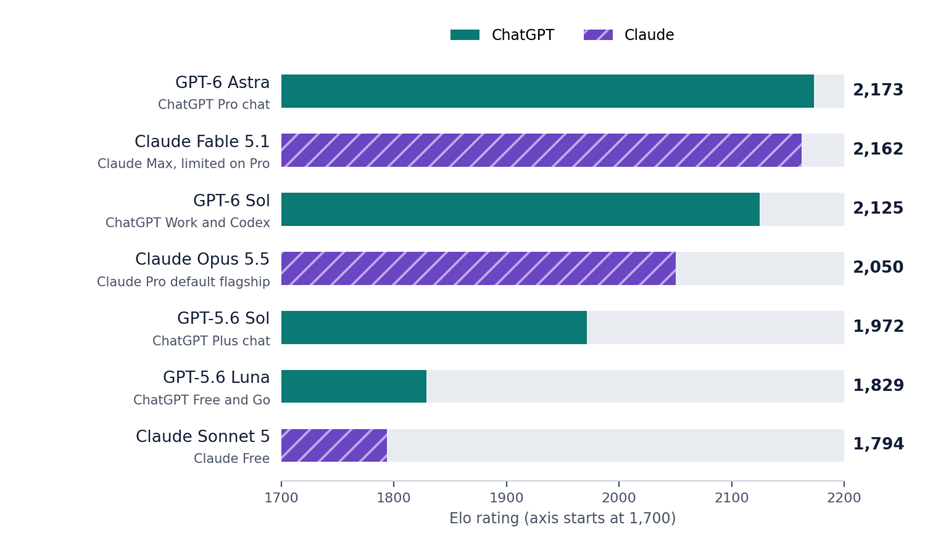
Higher is better. Positions shift as new comparisons are added.
Novella-length writing (EQ-Bench Longform, score out of 100)
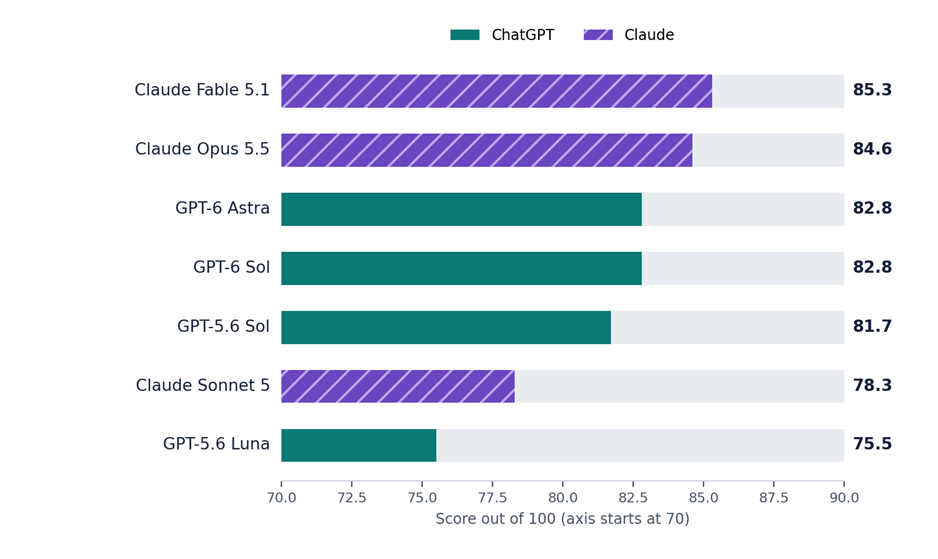
Rewards stamina and consistency across eight chapters as much as style.
Head to head at each price point
| Price point | Default models | Short-form Elo | Longform | Slop (lower is better) | Edge |
|---|---|---|---|---|---|
| Free | ● GPT-5.6 Luna ■ Sonnet 5 | 1,829 1,794 | 75.5 78.3 | 14.09 13.53 | Split |
| $20 | ● GPT-5.6 Sol ■ Opus 5.5 | 1,972 2,050 | 81.7 84.6 | 11.98 8.97 | Claude |
| $100 to $200 | ● GPT-6 Astra ■ Fable 5.1 | 2,173 2,162 | 82.8 85.3 | 9.07 7.59 | Near tie, slight Claude lean |
Slop score (from the longform test) counts how often phrases that AI models overuse appear. Bold marks the better number in each pair.
What human voters prefer (Arena Creative Writing, September 13, 2026)
| Rank | Model | Score | Votes |
|---|---|---|---|
| 1 | Claude Fable 5 (high effort) | 1504 | 6,073 |
| 6 | Claude Fable 5.1 (max effort) | 1486 | 1,233 |
| 11 | Claude Opus 5 (high effort) | 1474 | 9,196 |
| 12 | GPT-5.6 Sol (extra high effort) | 1473 | 5,344 |
| 25 | GPT-6 Astra (max effort), preliminary | 1461 | 572 |
| 28 | GPT-5.5 Instant | 1456 | 4,111 |
| 55 | Claude Sonnet 5 (high effort) | 1437 | 6,914 |
| 81 | GPT-5.6 Luna (extra high effort) | 1411 | 5,652 |
Claude Opus 5.5 launched after this snapshot and is not rated yet.
Read these numbers with care
- EQ-Bench’s judge is an Anthropic model, which may lean toward Claude-like prose. That is why the human-voted Arena board matters too.
- Arena voters tend to reward longer, polished answers, and new models have wide error bars (GPT-6 Astra: plus or minus 26 points).
- None of these boards measures factual accuracy, research quality or how well a model copies your voice.
Where all three agree: at the $20 tier Claude’s default model writes stronger prose, and at the top tier the two are neck and neck. The biggest jump on both sides is from the free model to the $20 model, so that upgrade is where your money works hardest.
Difference 1: How the prose sounds
Ask both tools for the same 800-word post and the drafts rarely differ on grammar. They differ on texture: rhythm, word choice and how often they reach for tired phrases.
| 25% | fewer overused AI phrases from Claude Opus 5.5 than GPT-5.6 Sol on EQ-Bench’s longform slop measure (8.97 vs 11.98), the default models on the two $20 plans. |
ChatGPT’s default: organized and energetic
ChatGPT produces well structured, skimmable content fast and is strong at persuasive and marketing copy. The flip side is a habit of reaching for headings and bullet lists; one G2 reviewer noticed Claude writes in real paragraphs while ChatGPT defaults to lists.
Claude’s default: warmer, but not flawless
Claude’s drafts usually read closer to a finished piece. Critics in a July 2026 community thread say it sometimes overdoes short, dramatic fragments. Both habits respond to clear instructions.
Teaching each tool your voice
| ● ChatGPT | ■ Claude | |
|---|---|---|
| Main voice control | Personality presets and custom instructions (Settings, Personalization) | Styles: presets or custom styles |
| Learns from samples | Indirectly, via instructions, Project files or a custom GPT | Directly: upload PDF, DOC or TXT samples and Claude builds a matching style |
| Reuse per project | Projects and custom GPTs | Projects with instructions and files |
| Where it slips | Saved memories can quietly override personality settings | Captures tone better than sentence-level quirks, per one hands-on test |
Bottom line: if sounding like yourself matters most, Claude starts closer. A good custom instruction narrows the gap in ChatGPT, but takes more setup.
Difference 2: Following instructions and editing your draft
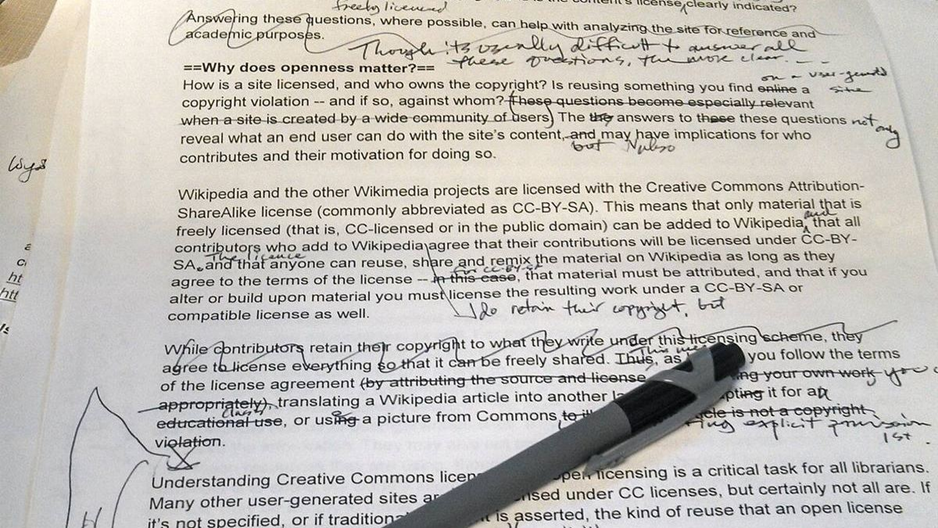
Most AI writing work is editing, not blank-page drafting.
OpenAI’s own usage study found writing made up 24% of ChatGPT messages by mid-2025, and that most writing requests ask the model to change text the user already wrote. So what matters most is who respects your draft and your rules.
| 2 in 3 | ChatGPT writing requests ask it to modify the user’s own text rather than write from scratch (OpenAI and NBER, September 2025). |
Instruction following
Community reports lean toward Claude here. Users say it keeps rules like “no bullet points” or “write in first person” through long responses. One person who paid for both for four months said Claude gives you one sentence when you ask for one, while GPT-5 tends to negotiate.
ChatGPT often wins when writing is wrapped around other work. A real estate and tax professional found it more versatile and better at reviewing PDF text.
The editing workspace
Both editors changed this year. OpenAI retired Canvas from its GPT-5.5 models in May, and in September Anthropic made it possible for Claude to create editable documents right inside the conversation.
| ● ChatGPT | ■ Claude | |
|---|---|---|
| Where drafts live | Writing blocks inside the chat (Canvas removed May 28, 2026) | Artifacts beside the chat, plus Claude Docs (beta since September 16, 2026) |
| Targeted edits | Select text, “Ask for changes,” undo or redo | Ask in chat or edit the document directly |
| Long documents | Full-screen editor with a table of contents | Persistent documents with attributed changes |
| Export | Download as PDF or Word, or Save to Library | Open in Google Docs or Word; share by link |
Bottom line: Claude is the safer choice when you need exact edits and nothing else. ChatGPT is the better all-in-one when editing means reading a stack of source files first.
Difference 3: Long documents, limits and everything around the text
The third difference is practical: how much you can do before the tool stops you.
Long documents favor Claude
On paid plans Claude’s chat holds 1M tokens with Opus 5.5, Sonnet 5 and Fable 5.1, while ChatGPT Plus tops out at 256K in reasoning mode and 54K in instant mode. For a manuscript, a long report or a folder of transcripts, this is the biggest structural gap between them.
Usage limits favor ChatGPT
Since August 2026, ChatGPT Free allows unlimited everyday text chats with GPT-5.6 Luna, and Plus publishes no cap on everyday chat. Claude uses rolling five-hour sessions plus weekly limits, and hitting them is the most common reason people give for leaving. A Zapier reviewer prefers Claude but moves big data jobs to ChatGPT to save their allowance.
Extras and distractions
ChatGPT bundles image generation, voice, deep research and custom GPTs, and is coming to Microsoft Word for workspaces from October 1, 2026. Claude focuses on text and documents: Projects, Styles, Docs and Slides. One more thing writers notice: ChatGPT shows ads on its Free and Go plans while Plus and higher stay ad-free, as Forbes reported when the rollout was announced. Anthropic has publicly committed to keeping Claude ad-free.
Bottom line: Claude holds more of your project at once. ChatGPT lets you do more, more often, before anything interrupts you.
Real user feedback: what writers say after months with both
Opinions are paraphrased from public reviews and threads unless quoted.
4.7/5 ChatGPT on G2, from 2,879 reviews | 4.4/5 Claude on G2 (Winter 2026 Grid data) | 93% G2 satisfaction with Claude’s natural conversation |
“anthropic accidentally built a brilliant coworker. openai accidentally built a very competent butler”
u/Ashtonator28 on r/ClaudeAI, as quoted in Chris Alarcon’s July 2026 roundup
What writers praise about Claude
A marketer testing emails, landing pages and LinkedIn posts said the drafts picked up their short sentences and direct tone, and actually sounded like them. G2 Learn review
A user who paid for both for four months called Claude the clear winner for long-form writing and structured documents. r/ClaudeAI, via Chris Alarcon
A teacher said Claude’s output was so detailed it barely needed adapting. r/claude, via Chris Alarcon
What frustrates Claude users
Usage limits: hitting the cap mid-project is the most common reason people give for leaving. Arslan’s 2026 comparison
Occasional over-stylized prose built from short, dramatic fragments. July 2026 thread, via Arslan
Long editing sessions that drift off-tone, usually from very long chats rather than a weaker model; a fresh chat helps. Ritner Digital, June 2026
“makes it feel less like a chatbot and more like a collaborative workspace”
ChatGPT reviewer on G2
What writers praise about ChatGPT
A real estate and tax professional found it the most versatile option, with more correct answers and better PDF review, after using both on client work. u/Free-Writer-1123 on r/claude, via Chris Alarcon
A month-long tester found it faster for volume and structure, such as templated content or a quick batch of variations. Emergent, September 2026
Reviewers highlight how easily it fits into marketing, product and operations work without technical setup. G2 Learn, August 2026
What frustrates ChatGPT users
Inaccuracy is the top negative tag in G2 reviews (107 mentions), followed by unreliable information (68). CheckThat.ai, April 2026
Inconsistency: the same prompt can give a sharp answer one day and a thin one the next. Emergent, summarizing forum threads
Flattery: the “you’re absolutely right” reflex is called the most upvoted ChatGPT complaint of 2026. Arslan’s 2026 comparison
The pattern: people rarely disagree about which tool is smarter. Their writing is wrapped in different work. Voice-first writers drift to Claude, research and volume writers drift to ChatGPT, and many daily users keep both.
The complete workflow: writing a long article with both tools

Research and critique in one tool, drafting in the other, final judgment by you.
This is the routine that keeps coming up among people who pay for both. Each step says where to click and what to paste. With only one tool, run every step in that tool; the order still works.
Step 1. Teach both tools your voice (once, about 15 minutes)
In Claude
- Start a new chat and open the tools menu under the message box.
- Choose “Use style,” then “Create & edit styles.”
- Click “Create custom style,” then “Add writing example.”
- Upload two or three pieces that sound most like you (PDF, DOC or TXT), or paste the text.
- Click “Create style,” name it (for example “My blog voice”) and select it whenever you draft.
- Optional: choose “Describe style instead,” then “Use custom instructions (advanced),” and paste the voice rules below.
● In ChatGPT
- Click your profile icon, then Settings, then Personalization.
- Pick the plainest personality preset on offer.
- Turn on “Enable customization” and paste the voice rules into Custom instructions.
- Check Memory for old preferences that could conflict, and delete them.
- Optional: create a Project for your blog and upload two writing samples.
Voice rules for both tools Write in plain, direct English at a grade 8 to 10 reading level. Keep paragraphs to 2 to 4 sentences. Use active voice and concrete examples. Never use em dashes or ellipses. Use commas, periods or parentheses instead. Avoid these words: delve, tapestry, landscape, leverage, robust, seamless, game-changer. Do not open with a question or a dictionary definition. Use bullet points only when I ask for a list. If you are unsure of a fact, say so instead of guessing. |
Step 2. Build a sourced fact sheet
Best in ChatGPT with search or deep research on. Claude’s web search works too.
Ask for facts, not prose. The fact sheet keeps the draft honest and becomes your checklist later.
Research prompt I am writing a [LENGTH]-word article for [AUDIENCE] about [TOPIC]. Build a fact sheet, not a draft: 1. The 8 to 12 most important facts, each with the exact number, the date it was published and a link to the original source (not a blog that repeats it). 2. Two or three points where credible sources disagree. 3. Anything that changed in the last 90 days. Flag any fact you could not confirm from a primary source. |
Step 3. Outline before any drafting
Either tool. Ask for two options so you choose the angle.
Outline prompt Using the fact sheet below, propose two different outlines for this article. For each one give: a working title, 5 to 7 section headings, one sentence on what each section proves, and which facts it uses. Do not write any body text yet. [PASTE FACT SHEET] |
Step 4. Draft section by section in a Claude Project
Best in Claude with your custom style selected.
- In the sidebar, open Projects and create a project named after the article.
- Add the fact sheet and chosen outline as project knowledge.
- Paste your voice rules into the project instructions.
- Start a chat inside the project, select your style, and draft one section per message.
Drafting prompt Write section [NUMBER]: "[HEADING]" in about [WORDS] words. Use only facts from the fact sheet in this project. Keep every number exactly as written and keep its source link next to it. Follow my style. Open with the point, not a warm-up. After the section, list any sentence you were unsure about. |
Step 5. Cross-examine the draft in the other tool
Best in ChatGPT. A second model catches blind spots the first one shares with itself.
Critique prompt You are a tough editor. Do not rewrite my article. Instead, give me: 1. The 5 weakest claims or sentences, quoted, with why each one is weak. 2. Any counterargument a skeptical reader would raise that I have not addressed. 3. Places where the structure makes the reader work too hard. 4. Ten headline options under 65 characters and three meta descriptions under 155 characters. [PASTE DRAFT] |
Step 6. Revise only what needs revising
Back in Claude, or by hand.
Revision prompt Revise only the passages quoted below, using the notes next to each one. Keep every other sentence in the article word for word. Show me each revised passage on its own so I can compare it with the original. [PASTE QUOTED PASSAGES AND NOTES] |
Step 7. Fact-check every number yourself
No AI tool here. This step is yours.
Open every source link and confirm the number, the date, and that the context matches your sentence. Neither tool checks itself reliably.
Step 8. Strip the AI tells
Your editor’s find tool (Ctrl+F or Cmd+F).
- Search for long dashes and three-dot ellipses and replace them with commas, periods or parentheses.
- Search for every word on your banned list from step 1.
- Delete your first paragraph and see whether the article gets better. It often does.
- Read the piece out loud and rewrite any sentence you would never say to a friend.
Step 9. Export and publish
- From Claude
Ask Claude to turn the final text into a document (Claude Docs, beta), then open it in Google Docs or Word, or share it by link for review.
- From ChatGPT
Expand the writing block to full screen, then use Download for a PDF or Word file, or Save to Library.
Which plan should a writer buy?
| If you are | Our pick | Monthly cost |
|---|---|---|
| A casual writer | Free tiers of both. ChatGPT Free has no everyday chat cap; Claude Free resets every five hours. | $0 |
| A serious solo writer | Claude Pro for voice and long documents, or ChatGPT Plus for research, images and volume. | $17 to $20 |
| A professional on deadline | Both $20 plans. Two tools usually beat one $100 plan unless you keep hitting limits. | $37 to $40 |
| A book author | Claude Pro, moving to Max 5x if limits interrupt drafting sessions. | $20 to $100 |
Final verdict

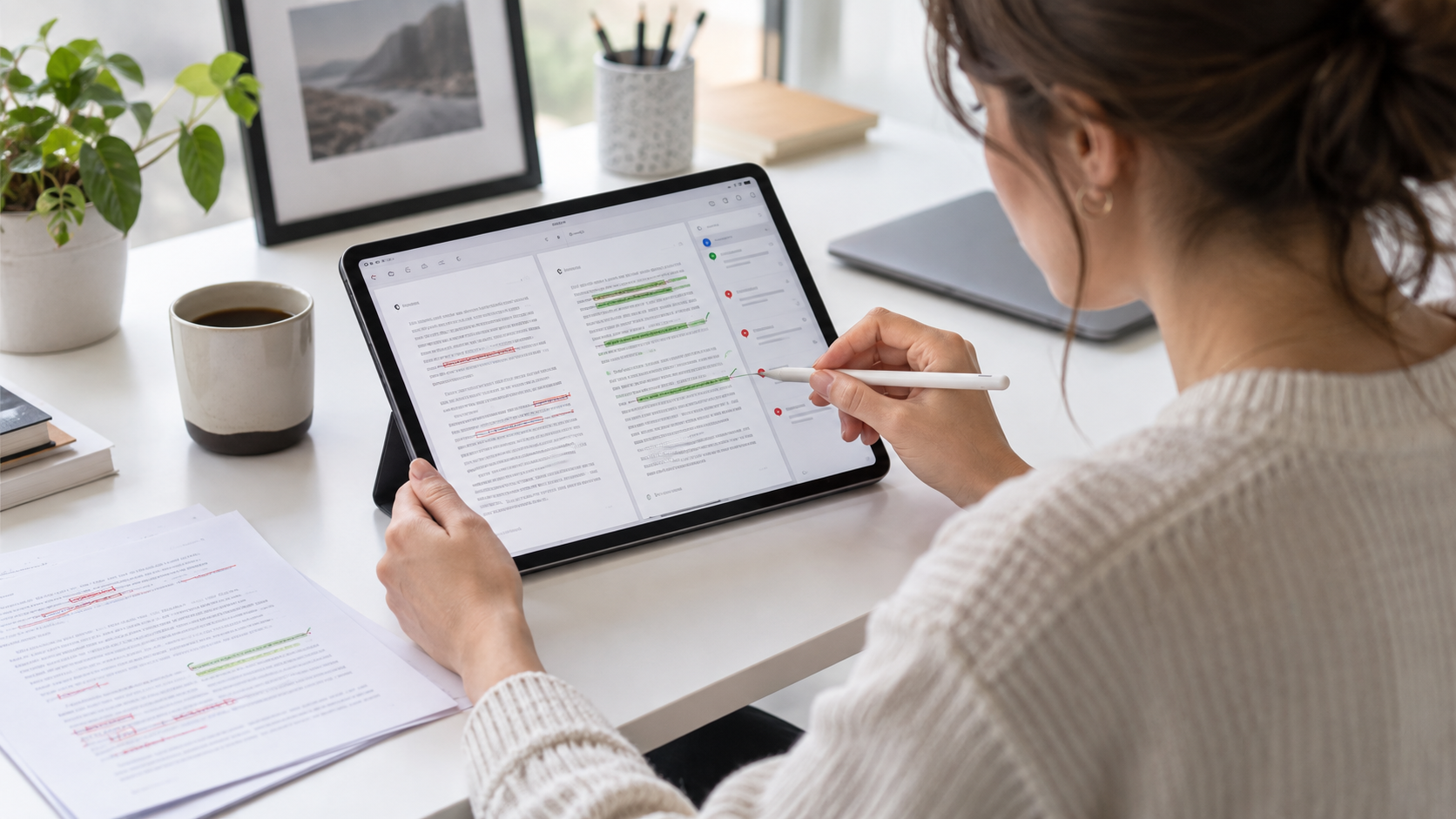
Whichever tool drafts, the last pass belongs to you. Photo: Brad Neathery, CC0, via Wikimedia Commons.
If you can only pay for one and most of your work must sound like you, start with Claude Pro. It scores higher at the $20 tier, follows constraints more reliably, and holds far more text in one chat.
If writing is one part of a mixed workload full of research, data, images and quick variations, start with ChatGPT Plus. It is the better all-rounder, rarely makes you wait, and its top model leads the short-form creative writing board.
If writing is your job, the honest answer is both, used in the order above. The tools are close enough now that the workflow matters more than the logo.
Discussion 0
More posts
Why AI Is Changing the Editing Process More Than the Writing Process
AI can fill a blank page in seconds. It cannot tell you whether the page is true, useful, or yours. That job is editing,...

Can AI Detectors Be Trusted?
What these tools actually measure, where they break, and how much weight their verdicts really deserve.

QuillBot on the free plan: what runs and what stops at the wall
A paraphraser, a grammar checker, and an AI detector in one place. Here is the walkthrough, what each tool does, and the...
Please log in or create an account to join the discussion.