How to Identify Content Decay Before Your Traffic Drops


Traffic reports tell you about problems months after they start. These early signals let you catch fading content while it is still easy to save.
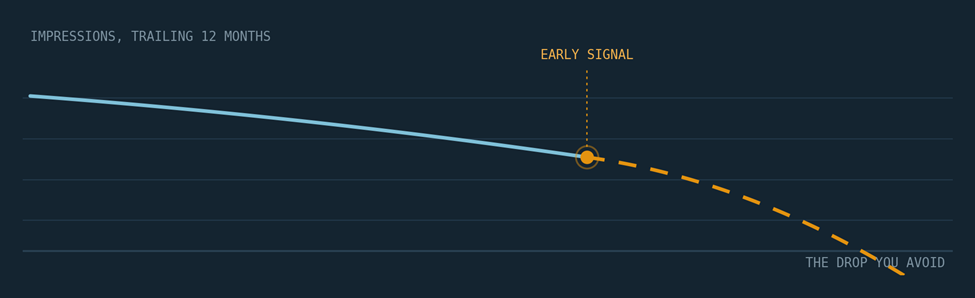
Most content teams find out about decay from a traffic report. By then the damage is already months old, rankings have slipped, and recovery takes far longer than prevention would have.
Content decay rarely announces itself. It shows up first as small movements in impressions, positions, and engagement, long before sessions fall off a cliff.
The good news is that every one of those movements is visible in free tools you already have. You only need to know where to look and what counts as a real signal.
Here is what this guide covers.
- The basics. What content decay is and the four-phase lifecycle every page moves through
- The causes. Six forces that pull rankings down, and why most decayed pages face several at once
- The signals. Five early warning signs, each with a rule-of-thumb threshold that means it is time to act
- The system. A 20-minute monthly check, a prioritization framework, and a repeatable fix process
What Is Content Decay?
Content decay is the slow, steady loss of search visibility and engagement that most pages experience as they age. A post that once ranked in the top three drifts to position six, then to page two, and its traffic follows.
It is different from a sudden drop. A sharp overnight loss usually points to a technical problem, a broken redirect, or a manual action, while decay is gradual, which is exactly why it slips past monthly reporting.
Every page moves through a predictable lifecycle, and decay is simply its final phase. Knowing which phase a page sits in tells you how urgently it needs attention.
PHASE 1 · GROWTH The page gets indexed, earns links, and climbs the rankings over its first weeks or months. | PHASE 2 · PEAK Rankings stabilize near their ceiling and the page delivers its maximum traffic. |
PHASE 3 · PLATEAU Growth stops and small metrics start softening while traffic still looks healthy. | PHASE 4 · DECAY Positions slide, clicks fall, and the loss finally becomes visible in reports. |
The plateau is where this guide earns its keep. Catch a page there and a light refresh usually restores it, but wait until phase four and you are often looking at a full rewrite.

Decay hides inside site-wide averages. Page-level dashboards reveal it months earlier.
Why Content Decay Happens
Decay is usually several forces working at the same time rather than a single cause. Diagnosing which forces are hitting a page matters, because each one calls for a different fix.
- Competitor pressure. Newer articles cover the same topic with more depth, better examples, or a format that matches what searchers now prefer
- Search intent shift. The query stays the same but the searcher's goal changes, so a how-to guide starts losing to comparison pages or tools
- Stale information. Statistics, screenshots, prices, and product names inside the post age out, and readers notice before rankings do
- Link equity erosion. Referring pages get deleted, redirected, or devalued, quietly draining the authority your page once borrowed
- Keyword cannibalization. Newer posts on your own site target overlapping queries and split the ranking signals between two URLs
- Technical drift. Slow loading, broken embeds, or layout problems creep in over the years and drag down the page experience
Google's regular core updates amplify all of these forces at once. Each update reassesses quality and relevance across the web, so a page that stops improving slowly loses to pages that keep earning that reassessment.
In practice, most decayed pages show two or three of these causes together. That is why the diagnosis step later in this guide checks the live search results, not just your own analytics.
The Early Warning Signs of Content Decay
Every metric below moves before traffic does. Watch them at the page level, not just in site-wide dashboards, because averages hide early decay.
Each signal comes with a rule-of-thumb threshold. Treat the thresholds as starting points and tighten them for your most valuable pages.

One softening metric is noise. Two or more moving together is a pattern worth acting on.
Impressions fall while clicks hold steady
Impressions are the earliest signal you have. When a page appears for fewer queries or at lower positions, impressions dip first while clicks briefly hold, because the page still converts the visibility it has left.
Check this by filtering the performance report to a single page and comparing two equal date ranges. Ignore single bad weeks and look for a stair-step pattern across months.
RULE OF THUMB: act when impressions fall 15 to 20 percent across two consecutive months without a seasonal explanation.
Average position slips within page one
A slide from position two to position five can cut traffic in half without looking dramatic in a rank tracker. Small positional losses on high-value queries that persist for several weeks are decay in progress, not noise.
Focus on the handful of queries that drive most of the page's clicks rather than the page-wide average. A stable average can hide a serious loss on the one query that actually pays the bills.
RULE OF THUMB: act when average position drops two or more spots on a money query and stays there for three straight weeks.
Click-through rate declines at a stable position
If position holds but CTR drops, the search listing itself is losing appeal. New SERP features, stronger competing titles, or an outdated year in your headline are the usual suspects.
Compare CTR across two equal date ranges while confirming position moved less than half a spot. If both conditions hold, the fix lives in your title and meta description, not in the article body.
RULE OF THUMB: act when CTR falls by a quarter or more while position stays within half a spot of where it was.
SIGNAL 04
The page ranks for fewer total keywords
Healthy pages tend to rank for a widening cloud of related queries. When that keyword count shrinks quarter over quarter, topical authority is eroding even if the head term still holds.
Count the unique queries sending impressions to the page each quarter. A shrinking count almost always precedes a fall in the head term itself.
RULE OF THUMB: act when the page's ranking keyword count shrinks two quarters in a row.
Engagement weakens on the page
Falling engagement time, shallow scroll depth, and quick returns to the results page all suggest the content no longer satisfies intent. Search engines pick up on the same dissatisfaction your analytics show.
Compare the page's current engagement time against its own six-month average rather than against the site as a whole. Pages have very different baselines, so only the trend within a page is meaningful.
RULE OF THUMB: act when engagement time runs 20 percent below the page's own six-month average.
Where to Find Each Signal
Use this table to connect each early signal to the exact report that surfaces it, the story it usually tells, and the threshold that separates noise from a real problem.
| EARLY SIGNAL | WHERE TO CHECK | WHAT IT USUALLY MEANS | RULE OF THUMB |
|---|---|---|---|
| Impressions down, clicks steady | Search Console performance report with a page filter and a three month comparison | Visibility is shrinking before traffic reacts | 15 to 20 percent drop across two consecutive months |
| Average position slipping | Query level data for the page across the last six months | Rankings are eroding on the queries that matter most | Two or more spots lost for three straight weeks |
| CTR falling at a stable position | CTR column compared across two equal date ranges | The listing is losing appeal or SERP features moved | A quarter of CTR lost while position holds |
| Fewer ranking keywords | Rank tracking history or query counts per page | The topical footprint of the page is contracting | Keyword count shrinks two quarters in a row |
| Weaker engagement | Analytics engagement time and scroll depth per page | The content no longer matches search intent | 20 percent below the page's six month average |
| Lost snippet or SERP feature | A manual search for the target keyword | A competitor now owns prime SERP real estate | Any loss of a feature the page previously held |
CHECK SIGNALS AT THE PAGE LEVEL. SITE-WIDE AVERAGES ARRIVE TOO LATE.
A 20-Minute Monthly Check to Catch Decay Early
You do not need an enterprise toolkit for this. A repeatable routine with free tools catches most decay months before it becomes visible.
Run it on the same day each month so comparisons stay clean. The time estimates below assume a library of up to a few hundred pages.

The monthly check works best as a fixed ritual with a fixed order.
01 - Compare rolling windows in Search Console
ABOUT 5 MINUTES
Open Google Search Console and compare the last three months against the previous three. Sort pages by impression change instead of click change to surface decay at its earliest stage.
Export the top pages to a spreadsheet while you are there. The export becomes your month-over-month record, which matters because the interface only shows sixteen months of history.
02 - Flag pages sliding within page one
ABOUT 3 MINUTES
Filter for pages whose average position moved by two spots or more. Prioritize queries where you fell out of the top three, since that band captures most of the clicks.
Skip queries with only a handful of monthly impressions at this stage. Thin data swings wildly and will fill your list with false alarms.
03 - Confirm the pattern in your analytics
ABOUT 4 MINUTES
Check the same pages in Google Analytics for falling engagement time or conversions, using the organic traffic segment and the same date windows. A page can lose rankings while engagement stays strong, which usually means the problem is competition rather than quality.
If engagement is falling too, the content itself has drifted from what searchers want. Note which case each flagged page falls into, because it decides the fix.
04 - Rule out shrinking demand
ABOUT 2 MINUTES
Look up your core keyword in Google Trends before assuming your page is the problem. If interest in the topic itself is falling, no refresh will bring the old numbers back.
Check the five-year view, not just the last twelve months. Long slow declines in demand are easy to mistake for decay you can fix.
05 - Study the live SERP
ABOUT 3 MINUTES
Search the keyword in a private browser window and read what ranks above you now. Note format changes, fresher publish dates, and new subtopics the winners cover that you do not.
Save a screenshot of the results page in your log. Next month it will show you exactly what changed, which no analytics tool can do.
06 - Log and score every decaying page
ABOUT 3 MINUTES
Record the URL, the signals you saw, and the likely cause in a simple sheet. Add two scores per page, one for business value and one for expected effort, each on a one to five scale.
Sort the sheet by value minus effort. The pages at the top are next month's refresh queue, already justified and ready to schedule.
How to Prioritize Which Pages to Refresh First
Not all decay deserves the same response. A fading pillar page and a fading three-year-old announcement post should never compete for the same hour of your time.
Sort every flagged page into one of four profiles. Each profile maps to one clear move, which keeps the refresh queue from becoming a debate.
| PAGE PROFILE | TYPICAL EXAMPLE | RECOMMENDED MOVE |
|---|---|---|
| High value, light fix | A converting guide with stale statistics and an outdated title | Refresh within the month |
| High value, heavy fix | A pillar page losing to a newer format like tools or templates | Schedule a full rewrite next sprint |
| Low value, salvageable | A thin post on a subtopic with rising related demand | Merge it into a stronger page on the same topic |
| Low value, obsolete | Coverage of a retired product, event, or feature | Prune it and redirect to the closest living page |
VALUE MEANS TRAFFIC, LINKS, AND CONVERSIONS COMBINED, NOT TRAFFIC ALONE.

Triage turns a scary list of fading URLs into a short, ordered work queue. Photo via Pexels.
One caution on pruning. Always redirect removed URLs to the closest relevant page, because mass deleting without redirects throws away link equity you spent years earning.
How to Fix a Page Once Decay Is Confirmed
A refresh beats a rewrite whenever the page's core structure still matches search intent. Most decayed pages need targeted surgery, not a blank document.
Work through this checklist for every page in the refresh queue.
- Update the facts. Replace old statistics, prices, screenshots, and product names with current ones
- Realign with intent. Match the format searchers now get rewarded with, whether that is a listicle, a comparison, or a tool
- Fill the gaps. Add the subtopics your SERP study showed competitors covering that your page skips
- Rework the listing. Rewrite the title and meta description to win back click-through rate, and drop any hardcoded old years
- Rebuild internal paths. Point links from newer, stronger pages into the refreshed one to send it fresh authority
- Modernize the visuals. Swap dated images and compress heavy files so the page loads fast on mobile
- Request a recrawl. Submit the updated URL for inspection so the changes get picked up quickly
While rewriting, keep Google's guidance on creating helpful content open in a second tab. It is a useful filter for deciding what to add and, just as often, what to cut.
Expect movement within two to six weeks of reindexing. Log the refresh date next to each URL so you can measure recovery instead of guessing at it.
Turning Detection Into a Repeatable System
Spotting one decaying post is useful. Building a system that catches every decaying post is what protects traffic at scale.

Decay detection scales when it becomes a shared team habit rather than one person's side task. Photo via Pexels.
That system is a content audit, a structured review of every page's performance, accuracy, and purpose on a recurring schedule. Once the habit exists, decay detection stops being a fire drill and pages get flagged, scored, and refreshed on a calendar instead of after a crash.
Related Reading
New to auditing? This guide to what a content audit is and why it matters breaks down how to run one step by step and how often to repeat it.
The monthly check and the audit feed each other. The check catches individual pages between audits, and the audit catches the structural problems no single page reveals.
How Often Should You Check for Decay?
Match the checking frequency to how much a week of unnoticed decay costs you. High value pages earn tighter monitoring, and everything else can run on a looser cycle.
- Monthly. Run the 20-minute check on your top revenue and traffic pages, since they lose the most value per week of decay
- Quarterly. Sweep the full library for the five signals and update your priority sheet
- Twice a year. Check aging winners for technical drift and lost backlinks, which page-level metrics can miss
- Two months before peak season. Review seasonal pages while there is still time to refresh and get reindexed
Put the check on the calendar. Decay monitoring only works when it survives busy months. Photo via Pexels.

Whatever cadence you pick, protect it. A check that gets skipped whenever the team is busy will always get skipped in the exact months decay accelerates.
Final Thoughts
Traffic drops are lagging indicators. Impressions, positions, click-through rate, keyword counts, and engagement all move first, and they move early enough for you to act.
Start small this week. Pick your ten most valuable pages, run the 20-minute check on just those, and log anything that crosses a threshold.
Then put the check on your calendar and refresh on a schedule. Teams that treat decay as routine maintenance rarely have to explain a traffic crash, because the crash never arrives.
Discussion 0
More posts

How to Find and Fix Keyword Cannibalization
Keyword cannibalization is what happens when two or more of your own pages chase the same search query. Instead of compe...
How to Find Orphan Pages and Fix Your Internal Linking
Every page on your site should be reachable through at least one link. When it is not, search engines struggle to find i...

Content Consolidation: When to Merge Competing Articles
When two or three of your own pages chase the same topic, they compete with each other instead of the rest of the web. H...
Please log in or create an account to join the discussion.