How to Find Orphan Pages and Fix Your Internal Linking

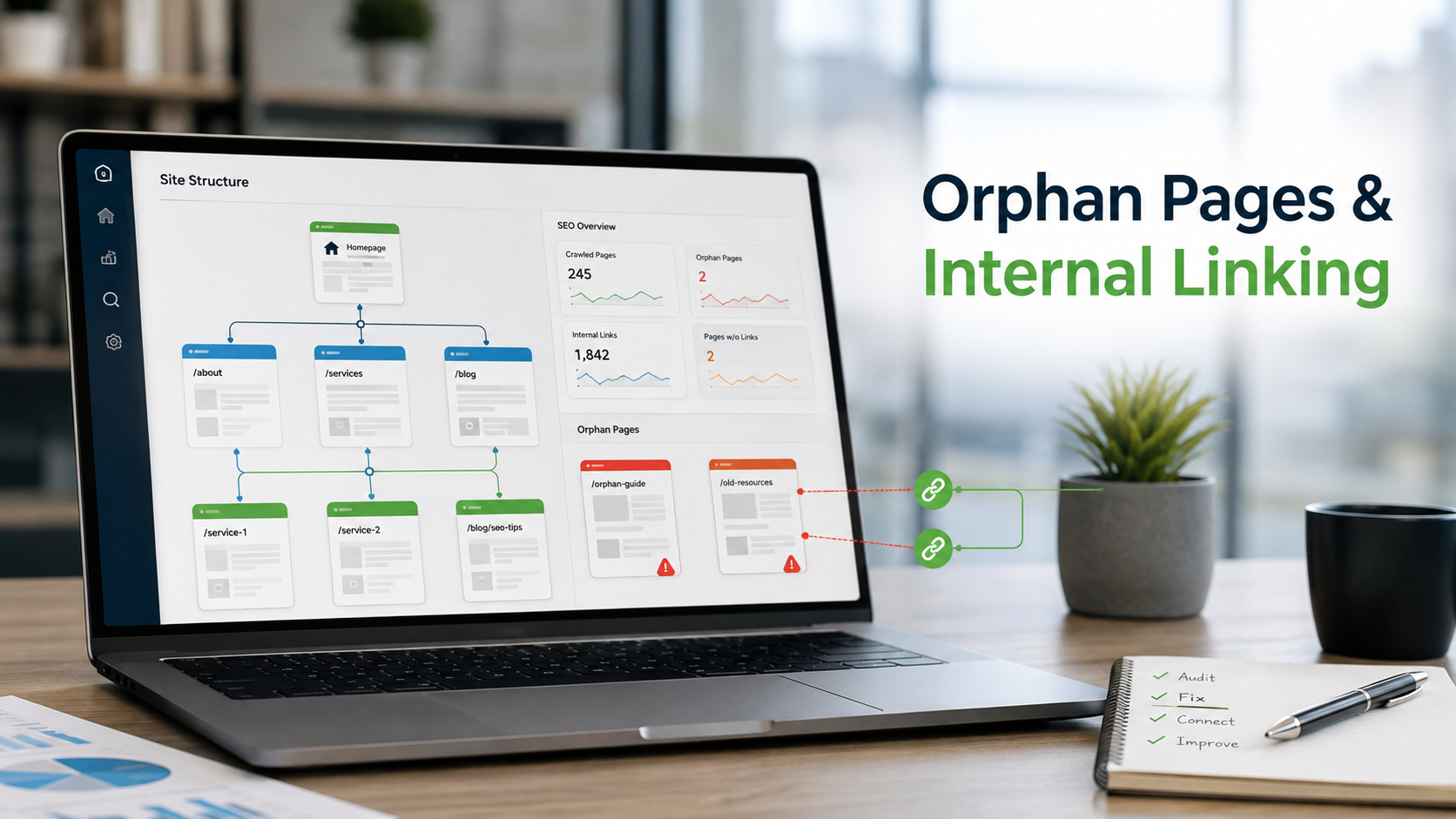
Every page on your site should be reachable through at least one link. When it is not, search engines struggle to find it and visitors never see it. This guide walks through spotting those pages and bringing them back into your site structure.
AT A GLANCE
What an orphan page is A live URL with zero internal links pointing to it | Why it matters No crawl priority, no link equity, no context, no path for visitors | What you need A sitemap, a site crawler, a spreadsheet, and Search Console | Time to complete Half a day for a small site, a few days for a large one |
Most websites grow in layers. New landing pages go live, old blog posts get archived, product lines change, and menus get redesigned. Somewhere in that churn, a few pages lose every link that once pointed to them.
These are orphan pages. They still exist, they may still be indexed, and they may even hold valuable content. But nothing on your site leads to them, so both users and search engine crawlers have no natural way to arrive.
What an orphan page is
A working definition, how crawlers actually move through a site, and the two neighbouring problems that get mistaken for orphans.
An orphan page is any live URL on your website that has zero internal links pointing to it. It is not in your navigation, not in your footer, and not referenced in the body copy of any other page.
Search engines discover most content by following links. Google's own documentation on crawlable links makes clear that a page needs to be linked from somewhere before a crawler can reliably reach it. A page with no inbound internal links can still be found through a sitemap or an external backlink, but it sits outside the structure that gives it context and authority.
How crawlers actually discover pages
A crawler starts with a set of known URLs, usually your homepage and anything in your sitemap. It fetches each page, extracts every link it finds, adds new URLs to its queue, and repeats. Pages that appear in many places get visited often. Pages that appear nowhere get visited rarely or never.
This is why a single link is the minimum and not the goal. A page with one inbound link from a deep, low traffic article is technically not an orphan, but it behaves like one. The crawler will reach it eventually, but it will treat it as unimportant.
Two problems that are often confused with orphans
- Dead-end pages have inbound links but no outbound links, so they trap users and crawlers. The fix is to add links out to related content.
- Deeply buried pages have links, but so few and so far from the homepage that they are rarely crawled or visited. The fix is to add links from pages closer to the top of the site.
All three hurt performance, but orphan pages are the most severe because they are effectively invisible inside your own site.
A quick example
Imagine an online store that sold a popular blender in 2023. The product page ranked well and earned a few backlinks from review sites. In 2024, the store redesigned its category pages and the blender was dropped from the listing because a newer model replaced it.
The old product page is still live. It still appears in the sitemap. But no category page, no related product module, and no blog post links to it any more. It is now an orphan, and its rankings will slowly fade as search engines see it as detached from the rest of the site.
Why orphans hurt SEO
Five connected effects, from crawling to conversion, that explain why this is worth a morning of your time.
They may never get crawled or indexed
If a page is not in your sitemap and has no links, a crawler may never encounter it. Even when it is in the sitemap, Google treats sitemap entries as hints rather than guarantees. A page with no supporting links can sit in the “Discovered, currently not indexed” state for months.
On large sites, this connects directly to crawl budget. Google explains in its guide to managing crawl budget that it prioritizes URLs based on signals like popularity and internal linking. Orphans sit at the bottom of that priority list.
They receive no link equity
Internal links pass ranking signals from one page to another. The basic idea behind PageRank still applies: a page that receives links inherits some of the authority of the pages linking to it. An orphan page gets none of this, so even strong content can rank poorly.
The effect compounds. Because the orphan has no authority to pass along, any pages it links out to also miss a small contribution. One orphan rarely matters much, but fifty orphans across a site represent a lot of authority that never circulates.
A page with no links has to prove its relevance entirely on its own.
They lose contextual meaning
Anchor text and the surrounding pages tell search engines what a page is about and how it relates to the rest of your site. A page about “running shoes for flat feet” linked from a guide on running injuries and a category page for stability shoes has a clear place in a topic. The same page with no links is a stranger to the rest of the site.
They create a poor user experience
Visitors who land on an orphan from search or social have no path forward except the main menu. There are no related articles, no next steps, and no breadcrumbs pointing to a parent category. Bounce rates on orphan pages are usually higher for exactly this reason.
They waste content investment
Every orphan page represents time and money spent on writing, design, and development. If nobody can reach it, that investment returns nothing. This is one reason a regular content audit matters so much: it surfaces pages that are still valuable but have fallen out of your site structure.
Where orphan pages come from
Nobody creates orphans on purpose. They are the side effect of nine ordinary site changes.

Redesigns are the single biggest source of orphan pages. Every time a menu is simplified or a template changes, some links quietly disappear.
| Cause | How it happens | Typical fix |
|---|---|---|
| Navigation redesign | Menu items are removed or consolidated and the pages they linked to are left live | Add links from category pages, hub pages, or the footer |
| Site migration | URLs change during a platform move and old internal links are not updated | Update links to the new URLs and add redirects for the old ones |
| Expired campaign pages | Landing pages built for ads or email are never linked from the main site | Link from a related evergreen page, or noindex and remove the page |
| Discontinued products | Products are pulled from category listings but the product page stays online | Redirect to the closest replacement or a relevant category |
| Pagination changes | Blog archives or listing pages are shortened, dropping older posts from the chain | Add tag pages, related post modules, or an HTML archive page |
| Content updates | A writer removes a paragraph that contained the only link to another article | Restore the link in the updated copy or add it elsewhere |
| Duplicate or test pages | Staging copies, A/B variants, or accidental duplicates are published and forgotten | Delete, canonicalize, or redirect to the primary version |
| JavaScript-only links | Links are injected by scripts that crawlers do not execute, so the HTML contains no anchor | Render links as standard anchor tags in the server HTML |
| Faceted or filtered URLs | Filter combinations generate pages that only exist when a user clicks a specific set of options | Canonicalize to the parent category or block the parameters |
When you find an orphan, take a moment to note which of these causes produced it. If most of your orphans trace back to one cause, such as a migration or a menu change, you can fix the root process rather than patching pages one at a time.
Finding orphan pages, step by step
Two lists, one comparison, and three ways to verify the result before you act on it.
The core method is simple. You need two lists: every page that exists, and every page a crawler can reach by following links. Any URL in the first list that is missing from the second is an orphan.
The details matter, though. A sloppy comparison produces hundreds of false positives, and a crawl with the wrong settings misses real orphans. Each step below includes the settings and checks that keep the results accurate.
1. Build a complete list of every URL on your site
Output: a master list in one spreadsheet column
Start with your XML sitemap, since it should already contain your important pages. Google explains how sitemaps work in its sitemap overview. If you use a sitemap index, open each child sitemap and collect the URLs from all of them.
Then add URLs from other sources, because a page missing from the sitemap is often the same page missing from your links. Useful sources include:
- A CMS export of all published pages, posts, and products
- Landing page reports from your analytics platform covering the last 12 months
- URLs listed in Google Search Console performance and indexing reports
- Server access logs, which show every URL that has been requested
- Backlink reports, which reveal pages other sites still link to
Combine everything into one column in a spreadsheet and remove duplicates. This is your master list.
2. Crawl your site the way a search engine would
Output: every page reachable through links alone
Run a site crawler starting from your homepage and let it follow every internal link. Do not seed it with the sitemap for this pass. A few settings make a real difference to accuracy:
- Respect robots.txt so the crawl matches what search engines can access
- Enable JavaScript rendering if your site loads links through scripts, then run a second crawl without rendering to see which links exist only in JavaScript
- Include nofollow links in the crawl, but flag them, because a page linked only with nofollow is still effectively an orphan
- Crawl all subdomains and both www and non-www versions if your site uses them
- Set the crawl limit high enough to reach every page, not just the first few thousand
Export the results with columns for URL, status code, crawl depth, and number of inbound links. You will use all four later.
3. Compare the two lists
Output: a filtered list of orphan candidates
Paste both lists into a spreadsheet and normalize them first. Strip trailing slashes, unify http and https, lowercase the domain, and remove tracking parameters so the same page does not appear twice under slightly different URLs.

The comparison itself takes minutes once both lists are clean. Most of the effort goes into normalizing the URLs.
With the master list in column A and the crawled list in column B, a simple formula flags the orphans:
=IF(COUNTIF(B:B, A2)=0, "Orphan", "Linked")
Filter for “Orphan” and you have your candidate list. Before trusting it, spot check ten or fifteen results by opening the page and searching your site for its title. A handful of false positives usually reveals a normalization problem you can fix in bulk.
4. Verify with Google Search Console
Output: confirmation of which orphans Google already knows about
Open the Page indexing report and review URLs marked as discovered or crawled but not indexed. Many of these will overlap with your orphan list. The overlap tells you which orphans Google already knows about but has decided not to prioritize.

Search Console shows you what Google has already discovered. The gap between what it discovered and what it indexed is often where orphans hide.
For individual pages, use the URL Inspection tool. The “Referring page” field shows which page Google used to discover the URL. If it shows only the sitemap, or reads “None detected,” you have confirmed an orphan from Google's point of view.
The Links report is also worth checking. Sort internal links by count from low to high. Pages with zero or one internal link cluster at the top and match closely with your crawl findings.
5. Check analytics for pages with traffic but no links
Output: a priority order for your fixes
Open your landing page report and filter for pages that receive sessions from organic search, referrals, or email. Then compare that list against your orphan candidates. Any orphan that still earns visits is a priority, because the audience is already arriving and simply has nowhere to go next.

Orphans that still receive traffic are the easiest wins. They already rank or already have backlinks, so a few internal links can lift them quickly.
A second useful filter is the reverse: pages with almost no sessions at all over the past year. These are often orphans that have already dropped out of the index. They are still worth reviewing, but they belong lower on the list.
6. Review server logs for crawler activity
Optional for small sites, essential above ten thousand URLs
Log files show which URLs search engine bots actually request. Pages that appear in your master list but never appear in the logs are both orphaned and ignored.
Filter the logs by user agent for Googlebot and Bingbot, then aggregate hits per URL over 30 to 90 days. Some bots spoof their user agent, so Google recommends verifying Googlebot by IP range before you draw conclusions from the data.
The log data also gives you a baseline. After you fix your internal links, you should see crawler hits on formerly orphaned pages rise within a few weeks. That is one of the clearest signals that the fix worked.
Keep a dated copy. Save your orphan list with today's date. When you repeat the process next quarter, you can measure whether your fixes held and whether new orphans are appearing at the same rate.
Choosing a detection method
No single method catches everything. Match the approach to your site size and the data you can access.
| Method | Strength | Limitation | Best for |
|---|---|---|---|
| Sitemap versus crawl | Direct and reliable when the sitemap is complete | Misses pages that are absent from the sitemap | Any site with a maintained sitemap |
| CMS export versus crawl | Catches pages the sitemap forgot | Exports can include drafts and non-public URLs | Sites on WordPress, Shopify, or similar platforms |
| Search Console reports | Shows how Google actually sees the site | Samples data and delays updates by days | Confirming suspected orphans |
| Analytics landing page filter | Highlights orphans that already earn traffic | Ignores pages with zero visits | Prioritizing which orphans to fix first |
| Server log analysis | Reveals true crawler behavior at scale | Requires log access and processing effort | Large sites and enterprise SEO |
| Backlink cross-check | Finds orphans that other sites still link to | Only covers pages with external links | Rescuing pages with existing authority |
For most small and mid-sized sites, the sitemap comparison plus a Search Console check is enough. Add the analytics filter when you need to prioritize, and add log analysis once your site passes roughly ten thousand URLs.
Triage: keep, merge, or remove
Not every orphan deserves a rescue. Sort the list before you touch a single link.
A simple scoring approach helps: rate each page from one to three on traffic, backlinks, content quality, and topical fit, then total the scores. High scores go in the first group, middling scores in the second, and low scores in the third.
Keep and link The page is accurate, useful, and aligned with a topic you want to rank for. Old blog posts that still answer common questions belong here, as do product pages for items you still sell. Pages with existing backlinks or organic traffic go to the front of the queue. A few internal links can produce a visible lift within weeks. | Merge or redirect The page covers a topic that a stronger page already handles. Fold any unique details into the stronger page, then redirect the orphan with a permanent redirect so external links are preserved. Make sure the target is relevant. Redirecting a discontinued blender to its replacement keeps the topical connection; redirecting it to the homepage does not. | Remove The page is outdated, thin, or was never meant to be public. Delete it and return a 404 or 410 status, or apply noindex if it must stay reachable for a purpose such as a support link. A smaller site where every page is linked and maintained usually outperforms a larger one cluttered with forgotten content. |
If you choose the noindex route for any page, Google's guide to robots meta tags explains exactly how the tag behaves and what it does not do.
Repairing your internal links
Give every rescued page several relevant inbound links from pages that already carry traffic and authority.

Most internal linking fixes happen inside the editor, one article at a time. A short checklist keeps each edit consistent. Photo by Negative Space,
Add contextual links from related content
Contextual links inside body copy are the most valuable kind because they come with descriptive anchor text and topical context. Search your site for the orphan page's main keyword and its close variations. Every page that mentions the topic is a candidate for a natural link.
A quick way to find candidates is a site search in Google using the orphan's target phrase. The results show which of your pages Google already associates with that topic, and those pages are the best places to add a link.
Aim for at least three contextual links per rescued page. Spread them across different articles rather than stacking them on one, and place at least one link in the upper half of the linking page where it is more likely to be seen and clicked.
Connect orphans to hub pages
If you organize content in topic clusters, each orphan should link up to its cluster's hub page, and the hub should link back down. This two-way connection tells search engines where the page belongs and gives it a short path from the homepage.
If you do not have hub pages yet, an orphan audit is a good moment to create them. Group the rescued pages by topic, write a hub that introduces each topic, and link to every page in the group from the hub.
Use navigation and footer links selectively
Menus and footers reach every page on the site, which makes them powerful but easy to overload. Reserve these spots for pages that matter across the whole site, such as key service pages or cornerstone guides. Do not solve orphan problems by dumping dozens of links into the footer.
Add related content modules
Automated “related posts” or “you may also like” sections help spread links across large sites, especially blogs and stores. Configure them to prioritize topical relevance, and limit each module to four or five items so each link carries some weight.
Check that the module is rendered in HTML rather than loaded only through JavaScript. Google's JavaScript SEO basics explain that rendered links can be discovered, but server-side HTML links are more reliable and are found on the first crawl rather than a delayed render pass.
Write anchor text that describes the destination
Avoid generic anchors like “click here” or “read more.” Use a phrase that tells the reader and the crawler what the linked page covers. Vary the wording across different linking pages so the profile looks natural.
As an example, a guide on choosing running shoes might link to a stability shoe page with the anchor “stability shoes for overpronation,” while a blog post about marathon training might use “our stability shoe picks.” Both are descriptive, and neither repeats the exact same phrase.
Keep click depth shallow
Every important page should be reachable within three clicks of the homepage. After adding links, re-crawl the site and check the crawl depth column. Pages that still sit five or six clicks deep need a link from something closer to the top.
Remove obstacles that cancel your links
Adding a link only helps if the link actually passes signals. A few common problems quietly undo your work:
- A rel="nofollow" attribute on internal links, which is rarely intentional and should be removed
- A canonical tag on the orphan pointing to a different URL, which tells search engines to ignore the page
- A noindex tag left over from a staging environment
- Links wrapped in buttons or onclick handlers instead of standard anchor tags
Inspect the rescued page's source after you add links to confirm none of these are present.
Measuring whether the fix worked
Internal linking changes take a few weeks to show results. Four signals tell you the rescued pages are recovering.
First, re-run the crawl and confirm every rescued page now shows inbound links and a crawl depth of three or less. Second, check the Page indexing report for pages that have moved from “not indexed” to “indexed.”
Third, watch impressions and clicks for the rescued URLs in the performance report. Fourth, if you have log data, confirm crawler hits on those URLs have increased.
Record these numbers alongside the dated orphan list you saved earlier. Over two or three cycles you will build a clear picture of how quickly your site recovers from orphan issues and which types of fix produce the biggest gains.
The clearest sign of success is a crawler returning to a page it used to ignore.
Keeping orphans away for good
Fixing orphans once is useful. Building habits that stop them from reappearing is better. Use this as a standing checklist.
- Every new page gets at least two inbound links before it goes live, as part of the publishing workflow.
- The site is recrawled after any navigation change, redesign, or migration, and the results are compared against the URL list.
- When a page is retired, it is redirected or removed immediately rather than left live without links.
- A quarterly check repeats the sitemap versus crawl comparison and logs the results.
- The XML sitemap is generated automatically from the CMS so it stays in sync with what is actually published.
- Writers and editors have a short list of hub pages for each topic so new articles are linked from the right place by default.
Treating internal links as part of content maintenance, not just a one-time SEO project, keeps your site structure healthy as it grows. The SEO starter guide from Google Search Central is a good reference for the broader principles behind crawlable, well-organized sites.
The short version
Orphan pages are one of the easiest technical SEO problems to overlook and one of the most rewarding to fix. The pages already exist and the content is already written. All that is missing is a path for people and crawlers to reach them.
Build your full URL list, crawl the site, compare the two, and then give every worthwhile page a few strong, relevant internal links. Repeat the check on a schedule and fold linking into your publishing process. Your site structure will stay clean, your crawl budget will go further, and the content you have already paid for will finally get the visibility it deserves.
Written for site owners, marketers, and content teams who want every page to pull its weight.
Discussion 0
More posts

How to Find and Fix Keyword Cannibalization
Keyword cannibalization is what happens when two or more of your own pages chase the same search query. Instead of compe...

Content Consolidation: When to Merge Competing Articles
When two or three of your own pages chase the same topic, they compete with each other instead of the rest of the web. H...

How to Refresh Old Blog Posts Without Losing Rankings
Older articles quietly lose traffic as facts age and search habits change. Here is how to update them so they climb back...
Please log in or create an account to join the discussion.