HyperWrite vs Grammarly: Which One Is Better for Everyday Writing?

One drafts for you. The other cleans up after you. If you only want to pay for one writing assistant, here is how to decide in an honest, side-by-side way.
HyperWrite A generative co-writer. It drafts emails, outlines, and posts from a rough prompt, autocompletes your sentences in Gmail and Docs, and can research with real citations. Pick it if you hate the blank page | Grammarly An editor that follows you everywhere. It fixes grammar, tone, and clarity in whatever you are already typing, and its Pro plan adds rewrites, plagiarism and AI-text checks. Pick it if you write plenty but want it cleaner |
The short answer
These two tools get compared constantly, but they are not really trying to do the same job. Grammarly is, at heart, an editor: it watches what you type across your browser and apps and suggests corrections and rewrites. HyperWrite is, at heart, a writer: you give it a topic or a half-formed thought, and it produces a draft, an outline, or a reply that you then shape.
That difference decides almost everything else in this comparison. For most people whose everyday writing means emails, messages, reports, and the occasional post, Grammarly is the safer default: it is cheaper on the annual plan, its free tier is genuinely usable, and it works in more places and more languages. HyperWrite earns its keep when the hard part of your day is producing words at all, not polishing them. Below is the full case for each, including where both of them fall on their faces.
What each tool actually is
HyperWrite: a co-writer with hundreds of small tools
HyperWrite comes from OthersideAI, a New York startup founded in 2020, and it is built around generation. The web app opens on a single question box and a set of quick tools such as Create Document, Rewrite Content, Flexible AutoWrite, and Scholar AI, with hundreds more behind them. Its signature trick is TypeAhead, an autocomplete that finishes your sentences inside Gmail, Google Docs, and other sites through its Chrome extension, which the product pushes hard because that is where it shines.
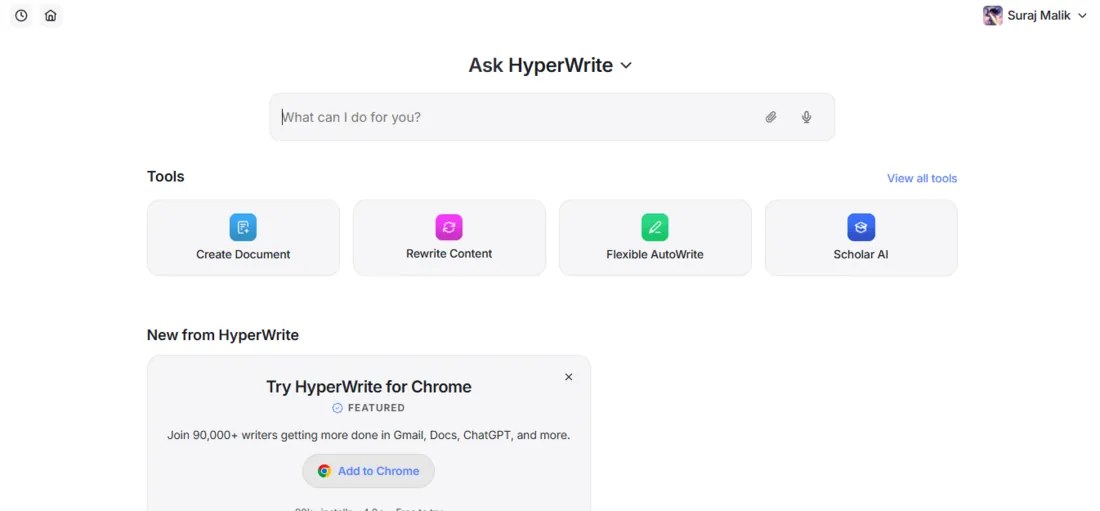
HyperWrite's dashboard: one prompt box, four quick tools, and a nudge toward the Chrome extension.
Two things set it apart from the crowd of AI writers. First, its paid plans include real-time web research with citations, so a draft about a current topic can point to actual sources. Second, the document editor asks clarifying questions, topic, audience, purpose, before it writes, which produces noticeably better first drafts than tools that just start typing.
Grammarly: the editor that lives everywhere you type
Grammarly has been around since 2009 and has grown from a comma-catcher into a full writing assistant. It checks grammar, spelling, punctuation, clarity, and tone in real time across roughly half a million apps and websites, from Gmail and Word to Slack and LinkedIn. The paid Pro plan adds full-sentence rewrites, tone adjustment, a plagiarism checker, an AI-text detector, and a generative sidekick with a 2,000-prompt monthly allowance.
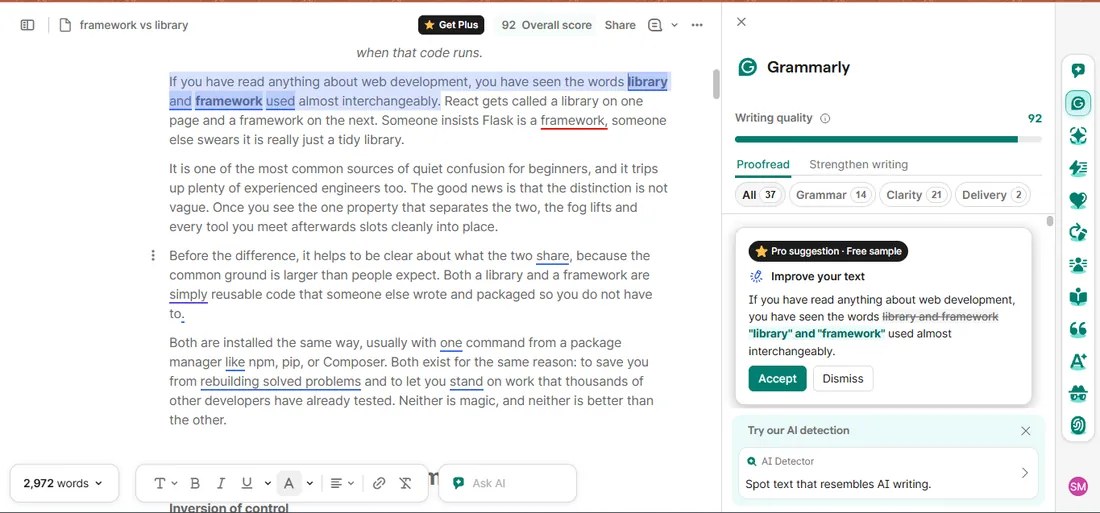
Grammarly's editor during our hands-on test: an uploaded document, an overall score of 92, and suggestions sorted into Grammar, Clarity, and Delivery.
One naming note so the pricing pages do not confuse you: the old Premium and Business tiers were folded into a single Pro plan, and in late 2025 the parent company renamed itself Superhuman after acquiring the email app of the same name. The writing product itself is still called Grammarly, and it still works the way you remember, only with more AI layered in.
Head-to-head on the things that matter daily
| Feature | HyperWrite | Grammarly |
|---|---|---|
| Core job | Generating drafts from prompts, plus rewriting | Correcting and improving what you already wrote |
| Where it works | Web app + Chrome extension (Gmail, Docs, most sites) | Browser, desktop, mobile keyboards, Word, and about 500,000 apps and sites |
| Autocomplete | TypeAhead finishes whole sentences in your style | Suggests corrections and rewrites rather than continuing your thought |
| Research & citations | Real-time web search with citations, plus Scholar AI for academic sources | No built-in cited research; its AI works from your text and prompts |
| Plagiarism & AI checks | None built in | Plagiarism checker and AI-text detector on Pro |
| Languages | English only | English plus Spanish, French, German, Italian, and Portuguese |
| Free plan | A trial in practice: roughly 15 generations a month | Genuinely usable: unlimited basic checks plus 100 AI prompts a month |
| Starting paid price | $16/mo billed annually ($19.99 monthly) | $12/mo billed annually ($30 monthly) |
Read down that table and the pattern is clear. Grammarly wins on reach, price, languages, and safety nets. HyperWrite wins wherever the job is producing new words: sentence completion, first drafts, and researched writing with sources attached.
Difference in feel: how each one shows up while you type
Spend an hour with both and the biggest difference is not on any spec sheet. It is how they behave in the text box. Grammarly is reactive. It waits for you to write, then marks what you wrote with underlines you can hover and accept. It never puts words in your mouth, and on a good day you barely notice it until it catches something. On a bad day, a wall of underlines can feel like a teacher hovering over your shoulder.
HyperWrite is proactive. TypeAhead reads what you are writing and offers the rest of the sentence in faded text ahead of your cursor, and you press a key to accept it. That feels closer to a co-writer than a proofreader, and when the suggestion lands it is genuinely fast. The trade-off is subtle but real: a tool that finishes your sentences can also steer them, and reviewers note the suggestions sometimes lag a beat behind fast typists. If you think while you type, HyperWrite's rhythm will suit you. If you want to say exactly what you meant and get corrected afterward, Grammarly's will.
Difference in voice: personas versus preferences
Both tools claim to adapt to your style, but they mean different things by it. HyperWrite lets you build custom personas, three on Premium and ten on Ultra. You feed each one samples of your writing, and its drafts then come out sounding like that persona. For freelancers juggling clients or anyone who writes in more than one register, this is the closest either tool gets to writing as you rather than for you.
Grammarly works from the opposite direction. It learns which suggestions you accept, detects the tone of what you wrote, and can shift a passage toward friendlier, more confident, or more formal on request. On Pro, teams get a shared style guide and a brand tone so everyone's writing drifts toward the same standard. Put simply, Grammarly protects and adjusts a voice that already exists on the page, while HyperWrite manufactures one from scratch. Which you need depends entirely on whether the page starts full or empty.
Difference in limits: what runs out first
The two products also meter their AI in opposite ways, and this quietly decides how each plan feels after a month. Grammarly's core editing, the underlines and corrections, is unlimited on every plan including Free. Only generative requests count against your allowance of AI prompts: 100 a month on Free, 2,000 per member on Pro. Most everyday users never see the ceiling, because the thing they use constantly is the thing that is never counted.
HyperWrite flips that. Its core value is generation, and generation is exactly what gets metered. Premium's 250 AI messages a month sound like plenty until you realize every chat reply, rewrite, and document generation draws from the same pool, while only TypeAhead runs unlimited on paid plans. Write occasionally and 250 is generous. Generate all day and you will hit the cap mid-month and feel the pull toward the $44.99 Ultra tier. The rule of thumb: with Grammarly you pay for extras on top of an unlimited core, and with HyperWrite the core itself is the thing on the meter.
Six everyday situations, one winner each
Feature lists only get you so far, so here is how the choice plays out in the writing most of us actually do in a week.
- Replying to a full inbox. HyperWrite's TypeAhead drafts whole replies in your voice as you type; Grammarly polishes them but will not carry the load of composing. Winner: HyperWrite
- Polishing an important message. When the words exist and the stakes are high, Grammarly's tone and clarity suggestions catch the things you no longer see. Winner: Grammarly
- Starting a blog post or report from nothing. HyperWrite's editor asks about your topic and audience, then hands you a structured outline you can export to Word. Winner: HyperWrite
- Student essays. Split decision: HyperWrite for cited research and outlining, Grammarly for the final pass, since only Grammarly can check originality before you submit. Winner: Depends on the stage
- Writing in Spanish, French, or German. HyperWrite is English-only, so this one is not close. Winner: Grammarly
- Keeping costs at zero. Grammarly's free plan handles unlimited proofreading plus 100 AI prompts a month; HyperWrite's free tier runs out within a day or two of real use. Winner: Grammarly
What HyperWrite is like in practice, from a real test
Spec sheets flatter every tool, so it is worth looking at an actual first session. Our writer Priyanka Sharma recently created a fresh HyperWrite account and documented all five screens, from the landing page to a finished, exportable outline, in her step-by-step HyperWrite walkthrough. The short version: she typed a three-word prompt about black holes, the editor asked her a few clarifying questions instead of dumping filler, and it returned a titled outline with logical sections and one-click DOCX export.
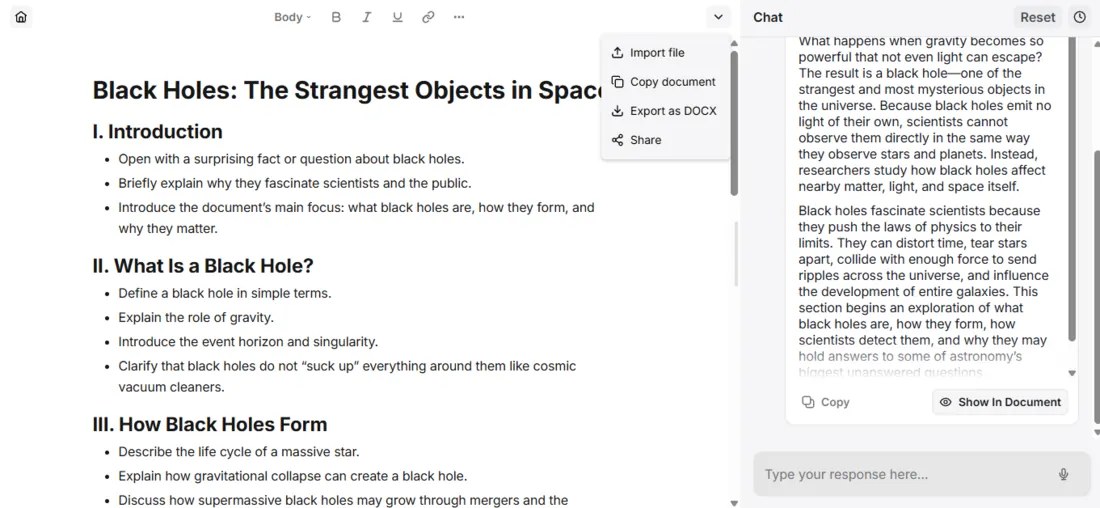
The outline HyperWrite built from a casual three-word prompt during our hands-on test, export to Word included.
| Her verdict after the test: 7.5 out of 10. Strong for emails, short posts, and first drafts; flatter and more generic on long-form prose, which still needs a human rewrite for voice. The browser extension, not the standalone editor, is the real product. |
That matches the wider pattern in public reviews of both tools. HyperWrite's happiest users write short and often; its frustrated ones expected finished articles. Grammarly's product ratings are consistently high, while its loudest complaints are about billing surprises on the annual plan rather than the writing help itself. Neither tool has a quality problem so much as an expectations problem.
Pricing in 2026
| Plan | Monthly | Annual (per month) | What you get |
|---|---|---|---|
| HyperWrite Free | $0 | $0 | About 15 generations a month with basic TypeAhead. A test drive, not a daily driver. |
| HyperWrite Premium | $19.99 | $16 | 250 AI messages, unlimited TypeAhead, three custom personas, real-time citations. |
| HyperWrite Ultra | $44.99 | $29 | Unlimited AI messages, ten personas, longer generations, priority support. |
| Grammarly Free | $0 | $0 | Unlimited grammar, spelling, and tone checks everywhere, plus 100 AI prompts a month. |
| Grammarly Pro | $30 | $12 | Full-sentence rewrites, tone adjustment, plagiarism and AI-text detection, 2,000 AI prompts. |
| Grammarly Enterprise | Custom | Custom | Unlimited AI usage plus company-grade security and admin controls. |
Two traps to know before you enter a card number. Grammarly's gap between monthly and annual billing is enormous, $30 versus an effective $12, and the annual plan charges the full year up front, which is the source of most of its billing complaints. HyperWrite's trap is quieter: Premium's 250-message cap is generous for casual use but easy to hit if you generate all day, at which point the product starts steering you toward Ultra.
Where each one falls short
HyperWrite's weak spots
- English only, which rules it out for multilingual writers entirely.
- No plagiarism or AI-detection checks, a real gap for students.
- Long-form output reads flat and safe until you rewrite it for voice.
- The standalone editor is less discoverable than the extension, and reviewers regularly say so.
Grammarly's weak spots
- It edits far better than it drafts; the blank page is still your problem.
- Some suggestions flatten distinctive writing into beige if you accept them all.
- Month-to-month pricing is steep, and the annual auto-renewal catches people off guard.
- The desktop apps can feel heavy or intrusive on slower machines.
The verdict
If you can only keep one: Grammarly is the better everyday pick for most people. It costs less on the annual plan, its free tier does real work, it covers six languages, it follows you into every app you already use, and its plagiarism and AI checks are safety nets nothing in HyperWrite replaces. Everyday writing is mostly editing your own words, and editing is exactly what Grammarly does best.
Choose HyperWrite instead if your bottleneck is producing words. If your day is a stream of emails, posts, and first drafts, its TypeAhead and prompt-driven editor genuinely shrink the work in a way Grammarly's suggestions never will, and its cited research is something Grammarly simply does not offer. And if your budget allows a third option, the two stack surprisingly well: Grammarly Free catching your typos while HyperWrite Premium writes the first drafts costs less than Grammarly Pro alone.
Whichever way you lean, both have free tiers. Spend one honest afternoon writing your own real emails and documents in each before paying anyone; that test settles this debate faster than any comparison article can.
Discussion 0
More posts

NovelAI: An Hour of Notes Before I Wrote a Single Word
A hands-on NovelAI review: the broken sign-up, the encryption catch, real pricing, the models, real user reviews, and wh...

StealthWriter AI : Hands-On Test of the Humanizer and AI Detector
I put StealthWriter AI through a real test: a Wikipedia paragraph that its detector scored 0% human was rewritten to 100...

Originality.ai: I Tested It and It Flagged Wikipedia as 100% AI
I pasted a plain Wikipedia paragraph into Originality.ai and it came back "Likely AI – 100% Confidence." Two scans later...
Please log in or create an account to join the discussion.