

Wordtune is not built to draft your document from nothing. Instead, it works on top of the words you have already put down and helps you phrase them better, sentence by sentence. To get a real feel for that, I took the editor for a proper spin. I dropped in a plain encyclopedia-style paragraph and worked my way through every single button it gave me.
What Wordtune actually is
Wordtune is an AI writing companion built by AI21 Labs. The tool reworks sentences, cleans up grammar, adjusts tone, and condenses lengthy passages. It does this either on its own dedicated page or as a browser add-on that follows you as you write elsewhere.
4.6/5G2, ~190 reviews
4.4/5Capterra, hundreds of reviews
4.2/5Trustpilot
Its open-ended Ask AI feature is powered by Jamba, AI21's in-house hybrid SSM-Transformer model with a large context window. Most of the sentence-level tools are usable for free up to a daily ceiling. There is more detail over on the official Wordtune site.
Getting set up
1. Head to wordtune.com and hit "Get Wordtune for free." The homepage is deliberately spare: a single promise, one button, and a clear line telling you no card is required.
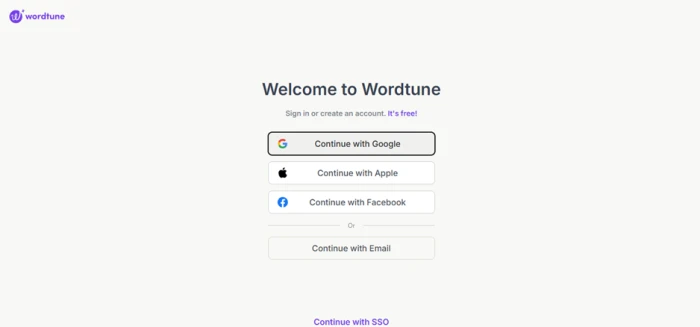
2. Make an account. You can sign up with Google, Apple, Facebook, email, or SSO. I went with Google and it was done in one tap.
3. Drop into the editor. There is no setup wizard and no walkthrough. You land on an empty page, ready to type or paste straight away.
Wordtune landing page
The homepage. The pitch stays narrow and upfront: it paraphrases, rewrites, and corrects grammar for text you have already written.
Wordtune sign-in options
Sign-in choices. Google, Apple, Facebook, email, and SSO are all supported, so nearly everyone is a click away from writing.
My observationThe onboarding is close to frictionless. One Google click and I was in, with no card and no forced tour eating up my time.
The editor and its toolbar
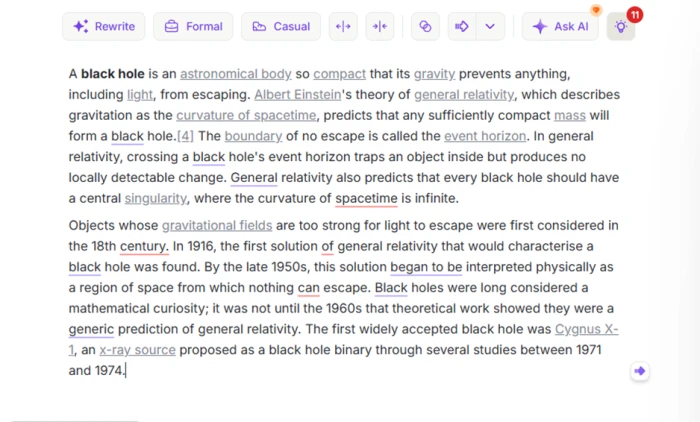
I pasted in a plain paragraph about black holes so the tool had something to chew on. The toolbar hovers directly above your text and carries every feature.
Reading left to right, you get Rewrite for fresh phrasing, Formal and Casual for tone, the shorten and expand controls, a copy button, an arrow to keep writing, Ask AI for open prompts, and a Proofread bulb, which flagged 11 issues on my paragraph.
Wordtune editor with pasted text
The editor with my pasted paragraph. The toolbar basically is the interface, so there is very little to learn.
My takeThe toolbar is pleasingly plain. Every tool sits one click away and is labelled in everyday language, so there is nothing to puzzle over.
Proofread and corrections
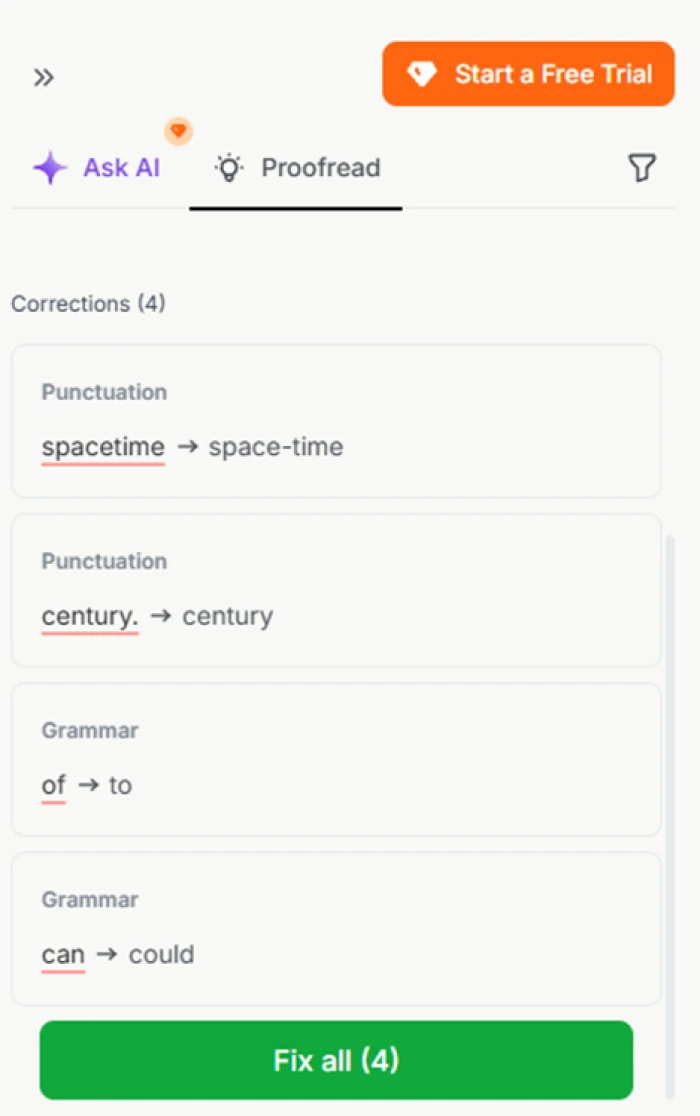
Tapping the bulb opens a Proofread panel. On my paragraph it surfaced four fixes and walked through each one in plain language.
It caught "spacetime" (suggesting "space-time"), a stray full stop after "century," swapped "of" for "to," and nudged "can" toward "could." A single Fix all button applies the lot in one go.
Wordtune Proofread panel
The Proofread panel. Each fix is tagged by type, shown as a before-and-after, and can be accepted one at a time or all together.
What I seeThe corrections were precise and specific, and Fix all is a genuine time-saver. This part is free, and honestly it alone justifies installing the extension.
Rewriting in a formal or casual tone
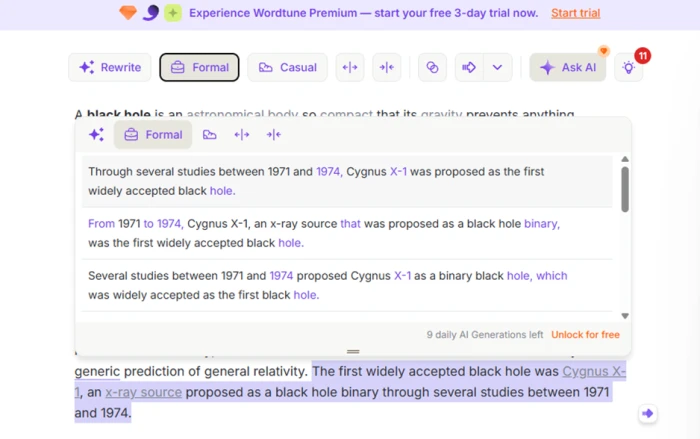
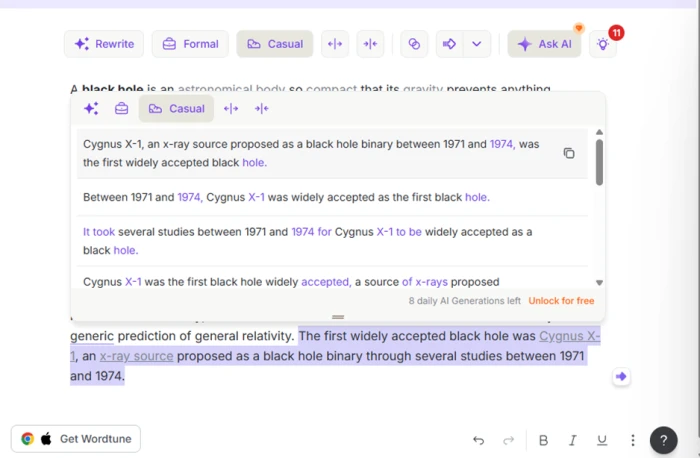
The tone buttons are really the core of the editor. I selected the sentence about Cygnus X-1 and ran both.
Formal handed back several tidied-up versions of the same line, while Casual returned looser, friendlier ones. Each pass offered three or four options to pick from, and every rephrasing held on to my original meaning.
The panel also displays a daily counter. It showed nine generations left after the formal run and eight after the casual one, with a soft prompt to upgrade.
Wordtune formal rewrites
Formal rewrites: several polished takes on one sentence, free within the daily generation cap.
Wordtune casual rewrites
Casual rewrites of the same line: same idea, lighter voice, and the counter dropped by one.
My observationThis is where Wordtune really earns its keep. Three or four solid rewrites per sentence beats staring at a blinking cursor. The daily limit is the only real catch on the free plan.
Ask AI, behind a paywall
Ask AI lets you type any instruction you like, such as "make it friendly." When I tried it, though, the feature was locked.
A panel told me Ask AI is a premium feature and offered a free trial to open it up. That open-ended prompt box is the one tool the free plan leaves out.
Wordtune Ask AI trial gate
Ask AI is gated. The prompt box accepts text, but sending anything triggers a trial. It runs on AI21's Jamba model.

My takeThis is the friction point. The most flexible feature is fenced off, and the upgrade nudges show up often. Fair enough for a business, mildly irritating in day-to-day use.
Browser extension vs. the web editor
One thing worth spelling out, because it was not obvious to me at first, is that Wordtune comes in two flavours, and they do not behave identically.
The web editor is the clean, distraction-free page I have been describing. You paste text in, the toolbar sits on top, and nothing else competes for attention. It is the best place to sit down and deliberately polish a draft.
The browser extension is a different experience. Once installed, Wordtune layers itself over other sites such as Gmail, Google Docs, LinkedIn, or your CMS, and offers the same rewrite and tone tools inline as you type. It is convenient, but it is also where the pop-up suggestions can start to feel intrusive, especially in apps that already have their own formatting toolbars fighting for space.
My rule of thumb after testing both: reach for the web editor when you are editing seriously, and keep the extension on only in the apps where you actually want inline help. Most browsers let you toggle an extension on per-site, which keeps it from popping up everywhere at once.
My takeTwo products, one brand. The web editor is calm and focused; the extension trades some of that calm for reach. Install the extension selectively rather than everywhere.
Pricing, in USD
Opening the plans shows three tiers, billed monthly or yearly, with yearly cutting roughly half the price.
Free Basic $0 forever
| Popular Advanced ~$6.99
| Best value Unlimited ~$9.99
|
Note: figures are in USD and shift with promotions, so check the pricing page for today's number. Team plans add shared access for around 7.99 dollars per user a month, and month-to-month Unlimited can run higher, up to about 19.99 dollars on some listings.
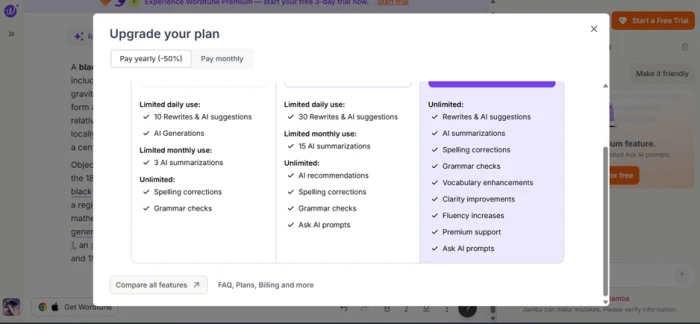
The upgrade panel. The yearly toggle shows a fifty percent discount, and each tier unlocks more daily use.
My takeThe free tier is genuinely usable for light editing. If you are rewriting all day, Unlimited pays for itself. Annual billing is the sensible route.
What real users say
Wordtune is well received across the major software-review sites, praised for how easy it is to use, with a handful of recurring complaints. Here are a few real ones, drawn from the top platforms.
Wordtune reviews from G2 and Capterra
A few real reviews from G2 and Capterra. Two are glowing; one is honest about the free plan's limits.
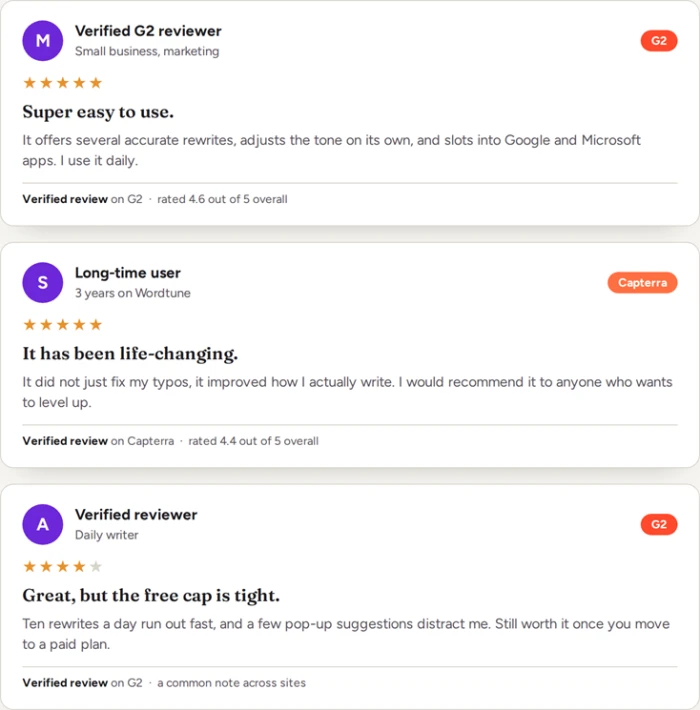
- Reviewers describe it as easy to use, with accurate and varied phrasing, and a genuine help for non-native English writers. One G2 user boils it down to it simply being very easy to use.
- On Capterra, a long-time user called the impact on their writing transformative and now leans on it daily.
- The most frequent complaint is the free ceiling of ten rewrites a day, and some find the pop-up suggestions distracting.
- One Capterra reviewer described losing work when pages went blank, with support unable to resolve a long-standing bug.
- Others point out there is no built-in plagiarism checker and that the tone can feel a bit mechanical over longer text.
You can read through the full sets on G2 and Capterra.
My takeThe ratings line up with my own session. The core editing is strong and effortless, and the loudest gripes are about limits and price rather than quality.
Who Wordtune is actually for
After a full afternoon with it, I think Wordtune fits some people far better than others. Here is how I would map it:
- Non-native English writers. This is arguably the sweet spot. Being able to see three or four natural-sounding versions of a clumsy sentence is a fast, low-pressure way to build confidence.
- Professionals writing email and short business copy. The tone toggles shine here. Softening a blunt line or firming up a wishy-washy one takes seconds.
- Students polishing essays. The free proofreading and rewrites cover a lot, though the lack of a plagiarism checker means it will not replace a dedicated academic-integrity tool.
- People who draft from scratch. This is where it is a poorer fit. Wordtune improves what exists; it will not fill an empty page for you. If that is your need, a full drafting tool suits you better.
For deeper context on how sentence-level AI writing assistants like this fit into the wider category, the Wordtune entry on Wikipedia is a useful, neutral starting point.
My takeWordtune is a polisher's tool. If you already write and just want to write better, it is a strong pick. If you need words conjured out of thin air, look elsewhere.
Tips to get more out of the free plan
The free tier's ten-rewrites-a-day cap is real, but a little discipline stretches it a long way. A few habits that helped me:
- Proofread first, rewrite second. Grammar and spelling fixes are unlimited and free, so clean those up before spending a precious rewrite generation. Often the sentence is fine once the mechanical errors are gone.
- Rewrite only the sentences that matter. Do not burn generations on lines that are already clear. Save them for openers, closers, and anything a reader will judge you on.
- Batch your editing. Because the counter resets daily, it is smarter to polish in focused sessions than to trickle through edits and hit the wall mid-task.
- Lean on shorten and expand. These are quieter tools than Rewrite but do a lot of the same work, tightening a bloated sentence or fleshing out a thin one.
- Pair it with a free grammar checker. Running your draft through a second free tool like Grammarly before your final Wordtune pass means you spend fewer generations on things another tool catches for free.
My takeTreat rewrites as a scarce resource and the free plan covers a surprising amount. Most days I never came close to the ceiling once I stopped rewriting sentences that did not need it.
A few alternatives worth a look
If Wordtune is not quite the right fit, a handful of tools cover nearby needs.
- Grammarly is the closest "same lane" competitor. Like Wordtune it corrects grammar, spelling, and punctuation, but it leans harder into style, clarity, and consistency checking, and flags things like tone and wordiness across whatever you're writing. Its free tier is fairly capable for everyday correctness, which is why the article pairs it with Wordtune run Grammarly for the mechanical cleanup, then spend Wordtune's limited rewrites only where phrasing really matters.
- QuillBot overlaps most with Wordtune's core rewriting feature. Its headline tool is a paraphraser with several "modes" (standard, formal, fluency, and so on), plus a summarizer, and it tends to be cheaper than Wordtune. If the one thing you want is sentence rephrasing and condensing rather than a full editing suite, it covers that need at a lower price.
- ProWritingAid is the heavyweight for long-form work. Instead of quick sentence rewrites, it produces detailed reports on things like pacing, overused words, sentence variety, readability, and style , the kind of analysis that's genuinely useful for essays, reports, novels, and fiction, where structure over thousands of words matters more than polishing one line.
- Type.ai is the odd one out, and that's deliberate. It's a drafting/generation tool — it helps you produce whole pieces from a prompt or outline. The article includes it precisely because it fills Wordtune's biggest gap: Wordtune improves text you've already written and won't fill a blank page, so if drafting from scratch is your actual need, something like Type.ai fits better.
My verdict
After an afternoon inside the editor, here is where I land. I would happily keep Wordtune open to clean up my own writing, but I would not ask it to fill a blank page for me.
It smoothed out my clunky sentences in seconds, and the free tier covered most of what I needed. The instant I wanted real freedom, Ask AI wanted my card. So for me it is a polisher, not a writer, and at that one job, it earns its spot on my toolbar.
Discussion 0
More posts

NovelAI: An Hour of Notes Before I Wrote a Single Word
A hands-on NovelAI review: the broken sign-up, the encryption catch, real pricing, the models, real user reviews, and wh...

StealthWriter AI : Hands-On Test of the Humanizer and AI Detector
I put StealthWriter AI through a real test: a Wikipedia paragraph that its detector scored 0% human was rewritten to 100...

Originality.ai: I Tested It and It Flagged Wikipedia as 100% AI
I pasted a plain Wikipedia paragraph into Originality.ai and it came back "Likely AI – 100% Confidence." Two scans later...
Please log in or create an account to join the discussion.